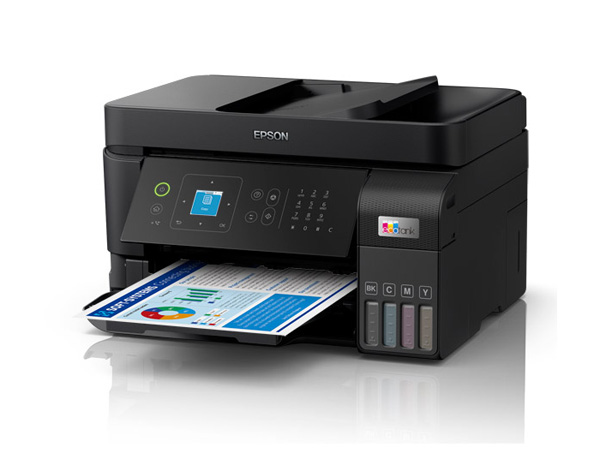
Epson EcoTank ET-4810 Support

Attention: Your operating system may not be detected correctly. It is important that you manually select your Operating System from above to ensure you are viewing compatible content.
Epson EcoTank ET-4810 Support
Downloads

Downloads

User Manuals
Start Here Guide
User Guide (HTML)
User Guide (PDF)
Video Manual
Tech Tips
Add printer using Mac OS X
How to Connect a Printer and a Computer
How to Connect a Printer with Mobile/Smart Device Using Epson Smart Panel
Installing the Additional Software - Mac OS X
Installing the Additional Software - Windows
Introduction of Epson Smart Panel
Video - Cleaning the print head via Mac
29 April 2022
Video - Improve Print Quality
Manuals & Documentation

Manuals and docs

User Manuals
Start Here Guide
User Guide (HTML)
User Guide (PDF)
Video Manual
Installation Instructions

Registration and warranty options

Set up your product
Open setup page
Registration & Warranty Options

Registration and warranty options

Register your product
To register your new product, click the Register now button.
Register now
CoverPlus
Protect your Epson product beyond the standard warranty period with an Epson CoverPlus plan. Find out more about our extended warranty options for your new product.
View CoverPlus options
FAQs

FAQs

How To
Apple AirPrint Support
Additional information:

Apple AirPrint™ is wireless printing right from your iPad, iPhone or iPod touch1. AirPrint on iOS devices makes it simple to print your email, photos, web pages, and documents. There's no software to download, no drivers to install, and no cables to connect. The application is compatible with Apple iOS, iPhone, iPad & iPod touch.

Epson Printers Supported*

  • View the list of printers and then click on the model of printer for more details.

    *Not all models may be available in your country.
  • Q: I'm unable to update the firmware on my product in order to print using AirPrint. What should I do?
    A: Make sure there is not an error on the product's control panel and that there is no memory card inserted in the product. If there is an error message, see the User's Guide for your product to resolve it.
  • Q: What is Apple's AirPrint technology?
    A: AirPrint allows Apple mobile devices and Macs to wirelessly print without installing a printer driver.
  • Q: What paper types are supported by AirPrint?
    A: The selections are product dependent. The following papers and/or media types maybe available:

    Plain Paper
    Photo High Gloss Paper
    Photo Glossy Paper
    Photo
    Photo Matte Paper
    Labels
    Inkjet Paper
    Plain Paper
    Envelope
  • Q: Sometimes a blank page prints when I print a multiple page document from Microsoft Word. What should I do?
    A: Convert the Microsoft Word document to a .pdf file, then print it from Adobe Reader. Epson is working on a solution for this issue.
  • Q: When I print multiple copies of the same photo I see a slight color change in the prints. What should I do?
    A: Please check back here for an update. Epson is working on a solution for this issue.
  • Q: Which Apple devices does AirPrint support?
    A: AirPrint supports the newest versions of Apple iPhone, iPod Touch and iPad/iPad 2.
  • Q: Which Apple mobile devices are supported?
    A: Any iPhone, iPod Touch and iPad/iPad 2 running iOS version 4.2 or later.
  • Q: Which Epson printers are supported?
    A: *See the list below:

    Artisan 730
    Artisan 837
    Epson Stylus NX430
    WorkForce Pro WP-4530
    WorkForce Pro WP-4540


    *Not all models may be available in your country.
  • Q: Which applications support AirPrint?
    A: Built-in Apple Apps such as Mail, Camera, Photos and Safari support AirPrint. Check with other App manufacturers to see if their Apps support AirPrint.
  • Q: Which paper sizes does AirPrint Support?
    A: It will depend on the App. For example, Mail and Safari support A4 and Letter-sized plain paper, while Camera and Photos support 4x6 Premium Glossy Photo Paper.
Product Information
Apple AirPrint Support
Additional information:

Apple AirPrint™ is wireless printing right from your iPad, iPhone or iPod touch1. AirPrint on iOS devices makes it simple to print your email, photos, web pages, and documents. There's no software to download, no drivers to install, and no cables to connect. The application is compatible with Apple iOS, iPhone, iPad & iPod touch.

Epson Printers Supported*

  • View the list of printers and then click on the model of printer for more details.

    *Not all models may be available in your country.
  • Q: What is Apple's AirPrint technology?
    A: AirPrint allows Apple mobile devices and Macs to wirelessly print without installing a printer driver.
  • Q: I'm unable to update the firmware on my product in order to print using AirPrint. What should I do?
    A: Make sure there is not an error on the product's control panel and that there is no memory card inserted in the product. If there is an error message, see the User's Guide for your product to resolve it.
  • Q: Sometimes a blank page prints when I print a multiple page document from Microsoft Word. What should I do?
    A: Convert the Microsoft Word document to a .pdf file, then print it from Adobe Reader. Epson is working on a solution for this issue.
  • Q: What paper types are supported by AirPrint?
    A: The selections are product dependent. The following papers and/or media types maybe available:

    Plain Paper
    Photo High Gloss Paper
    Photo Glossy Paper
    Photo
    Photo Matte Paper
    Labels
    Inkjet Paper
    Plain Paper
    Envelope
  • Q: Which Apple devices does AirPrint support?
    A: AirPrint supports the newest versions of Apple iPhone, iPod Touch and iPad/iPad 2.
  • Q: When I print multiple copies of the same photo I see a slight color change in the prints. What should I do?
    A: Please check back here for an update. Epson is working on a solution for this issue.
  • Q: Which Apple mobile devices are supported?
    A: Any iPhone, iPod Touch and iPad/iPad 2 running iOS version 4.2 or later.
  • Q: Which Epson printers are supported?
    A: *See the list below:

    Artisan 730
    Artisan 837
    Epson Stylus NX430
    WorkForce Pro WP-4530
    WorkForce Pro WP-4540


    *Not all models may be available in your country.
  • Q: Which applications support AirPrint?
    A: Built-in Apple Apps such as Mail, Camera, Photos and Safari support AirPrint. Check with other App manufacturers to see if their Apps support AirPrint.
  • Q: Which paper sizes does AirPrint Support?
    A: It will depend on the App. For example, Mail and Safari support A4 and Letter-sized plain paper, while Camera and Photos support 4x6 Premium Glossy Photo Paper.
Solve a Problem
Apple AirPrint Support
Additional information:

Apple AirPrint™ is wireless printing right from your iPad, iPhone or iPod touch1. AirPrint on iOS devices makes it simple to print your email, photos, web pages, and documents. There's no software to download, no drivers to install, and no cables to connect. The application is compatible with Apple iOS, iPhone, iPad & iPod touch.

Epson Printers Supported*

  • View the list of printers and then click on the model of printer for more details.

    *Not all models may be available in your country.
  • Q: What is Apple's AirPrint technology?
    A: AirPrint allows Apple mobile devices and Macs to wirelessly print without installing a printer driver.
  • Q: I'm unable to update the firmware on my product in order to print using AirPrint. What should I do?
    A: Make sure there is not an error on the product's control panel and that there is no memory card inserted in the product. If there is an error message, see the User's Guide for your product to resolve it.
  • Q: Sometimes a blank page prints when I print a multiple page document from Microsoft Word. What should I do?
    A: Convert the Microsoft Word document to a .pdf file, then print it from Adobe Reader. Epson is working on a solution for this issue.
  • Q: What paper types are supported by AirPrint?
    A: The selections are product dependent. The following papers and/or media types maybe available:

    Plain Paper
    Photo High Gloss Paper
    Photo Glossy Paper
    Photo
    Photo Matte Paper
    Labels
    Inkjet Paper
    Plain Paper
    Envelope
  • Q: Which Apple devices does AirPrint support?
    A: AirPrint supports the newest versions of Apple iPhone, iPod Touch and iPad/iPad 2.
  • Q: When I print multiple copies of the same photo I see a slight color change in the prints. What should I do?
    A: Please check back here for an update. Epson is working on a solution for this issue.
  • Q: Which Apple mobile devices are supported?
    A: Any iPhone, iPod Touch and iPad/iPad 2 running iOS version 4.2 or later.
  • Q: Which Epson printers are supported?
    A: *See the list below:

    Artisan 730
    Artisan 837
    Epson Stylus NX430
    WorkForce Pro WP-4530
    WorkForce Pro WP-4540


    *Not all models may be available in your country.
  • Q: Which applications support AirPrint?
    A: Built-in Apple Apps such as Mail, Camera, Photos and Safari support AirPrint. Check with other App manufacturers to see if their Apps support AirPrint.
  • Q: Which paper sizes does AirPrint Support?
    A: It will depend on the App. For example, Mail and Safari support A4 and Letter-sized plain paper, while Camera and Photos support 4x6 Premium Glossy Photo Paper.
ICC Profiles
Notes: The profiles provided below are in addition to the profiles that are built into your printer drivers. Please check your printer drivers as the built in media profiles are not displayed below.

ICC profiles

Material Safety Data Sheets

Safety data sheets

MSDS (Material Safety Data Sheet)
T522 - EcoTank - Black Ink Bottle
08 February 2023
T00M1_en_30.pdf
T522 - EcoTank - Cyan Ink Bottle
08 February 2023
T00M2_en_10.pdf
T522 - EcoTank - Magenta Ink Bottle
08 February 2023
T00M3_en_40.pdf
T522 - EcoTank - Yellow Ink Bottle
08 February 2023
T00M4_en_40.pdf
T7703 Vivid Magenta Ink Cartridge
08 February 2023
T7703_en_40.pdf
T7705 Light Cyan Ink Cartridge
08 February 2023
T7705_en_40.pdf
T7707 Light Black Ink Cartridge
08 February 2023
T7707_en_40.pdf
T7708 Matte Black Ink Cartridge
08 February 2023
T7708_en_30.pdf
Videos

Videos

Contact us

Contact us

Contact us
If you have any technical queries or need general assistance, please fill out the form and our team will get back to you shortly.
Customer support form
Call centre hours:
Mon – Fri 8:00am – 8:00pm AEST
Sat – Sun 9:00am – 6:00pm AEST
FREE phone support* call: 1300 361 054
*Note Epson does not charge for telephone support.