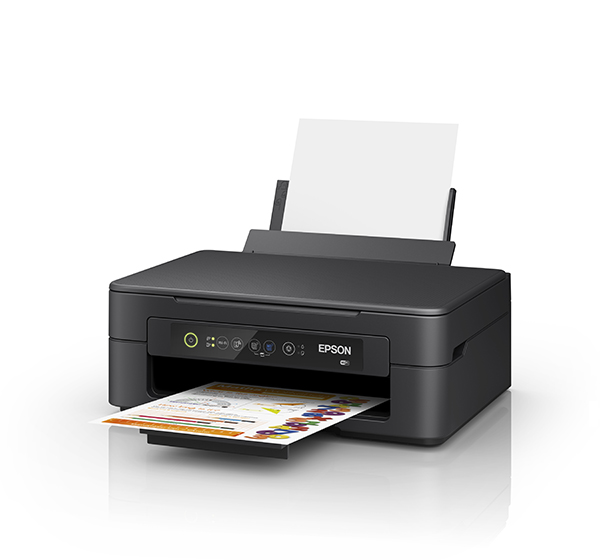
Epson Expression Home XP-2105 Support

Attention: Your operating system may not be detected correctly. It is important that you manually select your Operating System from above to ensure you are viewing compatible content.
Epson Expression Home XP-2105 Support
Downloads

Downloads

User Manuals
Setup Guide [Start Here]
22 August 2019
User's Guide
22 August 2019
Tech Tips
Add printer using Mac OS X
Checking and Changing Product Status Using Web Browser
Checking the connection using Ping Command - Mac OS
Checking the connection using Ping Command - Windows
Checking the printer port (windows only)
Installing the Additional Software - Mac OS X
Installing the Additional Software - Windows
Scan over Network using Epson Scan 2
Setting up and connecting from computer by WSD Port (for Windows only)
Setting up Standard TCP/IP Ports - Windows
Solution If you cannot connect print or scan by Wi-Fi Direct from a computer
Solution If you cannot connect print or scan by Wi-Fi from a computer
Solution If you cannot connect to the internet from a computer
Solution If you cannot print or scan by Wi-Fi Direct (Simple AP ) AP Mode from a smart device
Video - Cleaning the print head via Mac
29 April 2022
Video - Completing WI-Fi Setup using macOS
29 April 2022
Video - Completing WI-Fi WPS Setup using macOS
29 April 2022
Video - Completing WI-Fi Setup via USB using macOS
29 April 2022
Video - Completing WI-Fi Setup via USB using Windows
28 April 2022
Video - Completing WI-Fi WPS Setup
29 April 2022
Video - How to conect a Printer Directly with Mobile/Smart Device
21 April 2022
Video - How to connect a Printer and PC using USB cable Epson XP-2100)
22 April 2022
Video - How to connect a Printer with Mobile/Smart Device Using a WPS Button (Epson XP-2100)
22 April 2022
Video - How to connect a Printer with Mobile/Smart Device Using Epson Smart Pannel (Epson XP-2100)
22 April 2022
Video - How to Remove Missing Lines - Head cleaning (Epson XP-2100)
22 April 2022
Video - How to Replace Consumables (Epson XP-2100)
22 April 2022
Video - How to Replace Consumables Before It is Expended (Epson XP-2100)
22 April 2022
Video - How to scan multiple pages and make a single PDF file
28 April 2022
Video - Improve Print Quality
Video - Unpacking and Setting Up a Printer ( Epson XP-2100)
22 April 2022
Manuals & Documentation

Manuals and docs

User Manuals
Setup Guide [Start Here]
22 August 2019
User's Guide
22 August 2019
Installation Instructions

Registration and warranty options

Set up your product
Open setup page
Registration & Warranty Options

Registration and warranty options

Register your product
To register your new product, click the Register now button.
Register now
CoverPlus
Protect your Epson product beyond the standard warranty period with an Epson CoverPlus plan. Find out more about our extended warranty options for your new product.
View CoverPlus options
FAQs

FAQs

ICC Profiles
Notes: The profiles provided below are in addition to the profiles that are built into your printer drivers. Please check your printer drivers as the built in media profiles are not displayed below.

ICC profiles

Material Safety Data Sheets

Safety data sheets

MSDS (Material Safety Data Sheet)
C13T04J192 || 39 Std Capacity - Black Ink Cartridge
08 February 2023
T04J1_en_50.pdf
C13T04J292 || 39 - Std Capacity Cyan Ink Cartridge
08 February 2023
T04J2_en_40.pdf
C13T04J392 || 39 - Std Capacity Magenta Ink Cartridge
16 July 2025
190.58 KB
T04J3_en_50_AU7.pdf
C13T04J492 || 39 - Std Capacity Yellow Ink Cartridge
08 February 2023
T04J4_en_40.pdf
C13T04L192 || 39XL - High Capacity Black Ink Cartridge
08 February 2023
T04L1_en_50.pdf
C13T04L292 || 39XL - High Capacity Cyan Ink Cartridge
08 February 2023
T04L2_en_40.pdf
C13T04L392 || 39XL - High Capacity Magenta Ink Cartridge
16 July 2025
190.53 KB
T04L3_en_50_AU7.pdf
C13T04L492 || 39XL - High Capacity Yellow Ink Cartridge
08 February 2023
T04L4_en_40.pdf
Videos

Videos

Usage
Epson Smart Panel
Additional information:
An overview of the Epson Smart Panel app: turn your device into a command centre
Watch video
Contact us

Contact us

Contact us
If you have any technical queries or need general assistance, please fill out the form and our team will get back to you shortly.
Customer support form
Call centre hours:
Mon – Fri 8:00am – 8:00pm AEST
Sat – Sun 9:00am – 6:00pm AEST
FREE phone support* call: 1300 361 054
*Note Epson does not charge for telephone support.