Back catalogue – Expression 1680
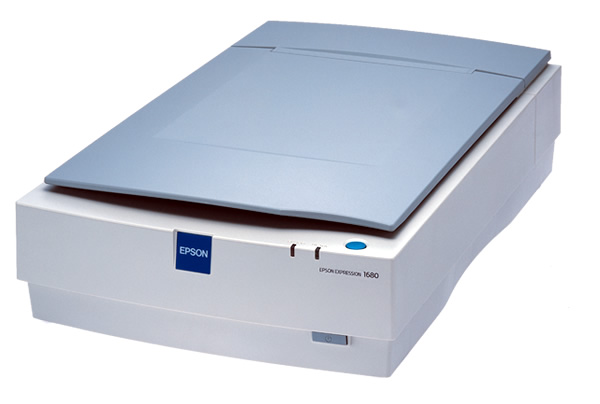
The Epson Expression 1680 delivers image and text scans that meet exacting professional standards. With a scanning resolution of up to 1600 x 3200 dpi with Micro Step Drive technology, true 48-bit colour, the most recent Epson TWAIN software for total control and an output resolution of up to 12,800 dpi, this scanner is the very essence of scanning and imaging excellence.
| SCANNER TYPE | |
|---|---|
| Flatbed colour image scanner | |
| SUB SCANNING METHOD | |
| Movement of scanning head | |
| PHOTOELECTRIC DEVICE | |
| Colour Matrix CCD line sensor | |
| DOCUMENT SIZE | |
| 216 x 297mm (A4 + US Letter) | |
| LIGHT SOURCE | |
| Xenon fluorescent lamp | |
| OPTICAL RESOLUTION | |
| 1,600 x 3,200dpi with Micro Step Drive Technology | |
| OPTICAL DENSITY | |
| 3.6 D Max | |
| PIXEL/LINE | |
| 40,800 pixels | |
| OUTPUT RESOLUTION | |
| Max 12,800dpi (at 200% zoom) 50 to 6,400 dpi (in single dpi steps) |
|
| EFFECTIVE PIXELS | |
| 13,600 x 18,720 pixels at 1,600dpi, 100% | |
| ZOOM | |
| 50% to 200% (in 1% steps) | |
| GRAYSCALE | |
| 16-bit (65,536 greyscale levels) external 16-bit (65,536 greyscale levels) internal |
|
| COLOUR | |
| 48-bit (281,474 billion colours) external 48-bit (281,474 billion colours) internal |
|
| SCANNING SPEED | |
| MONOCHROME (Draft mode) | |
| A4 300dpi | 11 sec. *1 |
| COLOUR SEQUENCE (Draft mode) | |
| A4 300dpi | 17 sec. *2 |
| EMBEDDED IMAGE PROCESSING | |
| Line art Digital halftoning (BI-Level, Quad-Level) Error diffusion 3 modes (A, B, C) Dither 4 modes (A, B, C, D) Dither (User specified A, B) AAS (Auto Area Segmentation) TET (Text Enhanced Technology) Tone correction Colour correction - Downloadable |
|
| SUPPORTED PLATFORMS | |
| Microsoft ® Window ® 95/98/NT ® 4.0/2000/Me/XP | |
| Macintosh ® OS 8.0 or later | |
| INTERFACES | |
| SCSI interface (50-pin half-pitch connectors) x 2 | |
| Windows ® 95/98/Me/2000 Professional/NT ® 4.0 | |
| Mac OS 8.0 or later | |
| USB interface | |
| Windows 2000 Professional/Me/98 | |
| Mac OS 8.5 or later | |
| IEEE1394 (Firewire) interface | |
| (optional IEEE1394 scanner I/F card is necessary) | |
| Mac OS 8.6 with Firewire 2.1 or later | |
| Windows 2000 Professional/Me | |
| ENVIRONMENTAL CONDITIONS | |
| TEMPERATURE | 5° to 35°C (operating) |
| HUMIDITY | 10% to 80% without condensation (operating) |
| ELECTRICAL SPECIFICATIONS | |
| VOLTAGE | AC220 - 240V |
| FREQUENCY | 50 to 60Hz |
| POWER CONSUMPTION | Approx. 50W (without optional unit) |
| DIMENSIONS (storage) | |
| WIDTH x DEPTH x HEIGHT | 332 x 562 x 133mm |
| WEIGHT | Approx. 8.5kg |
| *To use the USB port, your PC must conform to PC98 specifications, and have Windows® 98 pre-installed. Consult the documentation provided with your PC for further information about USB connectivity. Note also that errors may occur if non-standard cables or more than two hub connections are used. | |
| SCANNING SPEED DATA PATTERNS | |
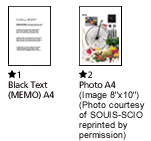
| The thumbnail images below show the scanning patterns used to determine scanning speed specifications. | |
 |
|
| Scanning Speed Test System Configuration | |
| CPU | Pentium III 450MHz |
| RAM | 256MB |
| SIZE | A4 |
| MODE | Draft mode |
| I/F | USB interface |
| Scanning speed test results vary according to system configuration, dpi setting, and scan mode setting. However documents and photos other than those pictured above can be substituted without significantly affecting the results. | |
| BUNDLED SOFTWARE | |
| Adobe Photo Shop Elements 2.0 CD | |
| Silverfast Si 6 for the Expression 1680 CD | |
| Epson Scan 1.1.0.1 | |
| Acrobat Reader 5.05 CD | |
Product Options
| Product Code | Description |
|---|---|
| Media Handling Options | |
| B813163 | Automatic Document Feeder (20 page) |
| B813183 | Transparency Unit |
| Interfaces | |
| B808343 | IEEE-1394 Firewire Interface |
| SCANNER TYPE | |
|---|---|
| Flatbed colour image scanner | |
| SUB SCANNING METHOD | |
| Movement of scanning head | |
| PHOTOELECTRIC DEVICE | |
| Colour Matrix CCD line sensor | |
| DOCUMENT SIZE | |
| 216 x 297mm (A4 + US Letter) | |
| LIGHT SOURCE | |
| Xenon fluorescent lamp | |
| OPTICAL RESOLUTION | |
| 1,600 x 3,200dpi with Micro Step Drive Technology | |
| OPTICAL DENSITY | |
| 3.6 D Max | |
| PIXEL/LINE | |
| 40,800 pixels | |
| OUTPUT RESOLUTION | |
| Max 12,800dpi (at 200% zoom) 50 to 6,400 dpi (in single dpi steps) |
|
| EFFECTIVE PIXELS | |
| 13,600 x 18,720 pixels at 1,600dpi, 100% | |
| ZOOM | |
| 50% to 200% (in 1% steps) | |
| GRAYSCALE | |
| 16-bit (65,536 greyscale levels) external 16-bit (65,536 greyscale levels) internal |
|
| COLOUR | |
| 48-bit (281,474 billion colours) external 48-bit (281,474 billion colours) internal |
|
| SCANNING SPEED | |
| MONOCHROME (Draft mode) | |
| A4 300dpi | 11 sec. *1 |
| COLOUR SEQUENCE (Draft mode) | |
| A4 300dpi | 17 sec. *2 |
| EMBEDDED IMAGE PROCESSING | |
| Line art Digital halftoning (BI-Level, Quad-Level) Error diffusion 3 modes (A, B, C) Dither 4 modes (A, B, C, D) Dither (User specified A, B) AAS (Auto Area Segmentation) TET (Text Enhanced Technology) Tone correction Colour correction - Downloadable |
|
| SUPPORTED PLATFORMS | |
| Microsoft ® Window ® 95/98/NT ® 4.0/2000/Me/XP | |
| Macintosh ® OS 8.0 or later | |
| INTERFACES | |
| SCSI interface (50-pin half-pitch connectors) x 2 | |
| Windows ® 95/98/Me/2000 Professional/NT ® 4.0 | |
| Mac OS 8.0 or later | |
| USB interface | |
| Windows 2000 Professional/Me/98 | |
| Mac OS 8.5 or later | |
| IEEE1394 (Firewire) interface | |
| (optional IEEE1394 scanner I/F card is necessary) | |
| Mac OS 8.6 with Firewire 2.1 or later | |
| Windows 2000 Professional/Me | |
| ENVIRONMENTAL CONDITIONS | |
| TEMPERATURE | 5° to 35°C (operating) |
| HUMIDITY | 10% to 80% without condensation (operating) |
| ELECTRICAL SPECIFICATIONS | |
| VOLTAGE | AC220 - 240V |
| FREQUENCY | 50 to 60Hz |
| POWER CONSUMPTION | Approx. 50W (without optional unit) |
| DIMENSIONS (storage) | |
| WIDTH x DEPTH x HEIGHT | 332 x 562 x 133mm |
| WEIGHT | Approx. 8.5kg |
| *To use the USB port, your PC must conform to PC98 specifications, and have Windows® 98 pre-installed. Consult the documentation provided with your PC for further information about USB connectivity. Note also that errors may occur if non-standard cables or more than two hub connections are used. | |
| SCANNING SPEED DATA PATTERNS | |
| The thumbnail images below show the scanning patterns used to determine scanning speed specifications. | |
|
|
|
| Scanning Speed Test System Configuration | |
| CPU | Pentium III 450MHz |
| RAM | 256MB |
| SIZE | A4 |
| MODE | Draft mode |
| I/F | USB interface |
| Scanning speed test results vary according to system configuration, dpi setting, and scan mode setting. However documents and photos other than those pictured above can be substituted without significantly affecting the results. | |
| BUNDLED SOFTWARE | |
| Adobe Photo Shop Elements 2.0 CD | |
| Silverfast Si 6 for the Expression 1680 CD | |
| Epson Scan 1.1.0.1 | |
| Acrobat Reader 5.05 CD | |
Product Options
| Product Code | Description |
|---|---|
| Media Handling Options | |
| B813163 | Automatic Document Feeder (20 page) |
| B813183 | Transparency Unit |
| Interfaces | |
| B808343 | IEEE-1394 Firewire Interface |