Back catalogue – WorkForce Pro WF-C529R
- Powered by Heat-Free PrecisionCore® – the next-generation of inkjet printing technology
- More prints, less cost – Epson ink lasts up to 7 times longer1 than its competition which helps reduce the overall cost of printing
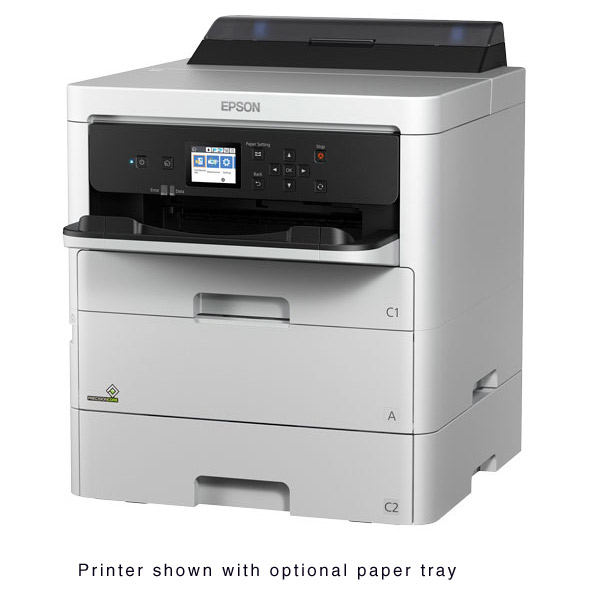
- Minimise your interventions – Replaceable Ink Pack System lets you print up to 50,000 ISO pages (black), 20,000 (colour) without changing the ink packs2; up to 330 sheets total paper capacity including an 80 sheet rear tray for envelopes and media. An extra tray can be added for up to 830 pages paper capacity, or two extra trays for 1330 pages.
- Fast print speed, no warm up time – 24 ISO ppm (mono)3; zero second warm-up, fast first page out
- Open-platform ready – seamless integration with enterprise applications such as PaperCut MF and other workflows; supports PCL4 and PostScript 3
- Security features – PIN certification for job release; user control access; printer and network settings via Web Config with printer's IP address; SSL/TLS security; IPsec
- Easy networking and administration – easy network setup designed for managed IT environments
- Wired and wireless connectivity – includes Wi-Fi Direct®; print from smartphones and tablets, including files from the cloud5
- 7 times more prints is comparing Epson XXL inks (50,000 pages Black / 20,000 colour) with the average highest yield toner of the top 4 highest selling MFP's in 0-35 ppm speed segment in the Australian market (Source: IDC October 2018).
- Replacement ink pack yields are estimated based on ISO/IEC 24711 test in Default Mode printing continuously. Ink pack yields vary considerably for reasons including images printed, print settings, temperature and humidity. Yields may be lower when printing infrequently. Ink is used for printing and printer maintenance, and ink has to be installed for printing. For print quality, part of the ink from the included ink packs is used for printer startup and a variable amount of ink remains in the ink pack after the "replace ink pack" signal. For details, see www.epson.com/inkinfo.
- Black and colour print speeds are measured in accordance with ISO/IEC 24734. Actual print times will vary based on factors including system configuration, software, and page complexity. For more information, visit www.epson.com/printspeed.
- Not all media types are supported for PCL printing.
- Only printing is supported under Windows Server OS.
| Printer | ||
|---|---|---|
| WorkForce Pro WF-C529R | C11CG79501 | |
| Printing Method | PrecisionCore 4S printhead 4 colour inkjet | |
| Printer Language | Epson ESC/P®- R, PCL 5 emulation1, PCL 6 emulation3, PostScript 3 | |
| Minimum Ink Droplet Volume | 3 droplet sizes, as small as 2.8 picolitres | |
| Duty Cycle2 | Up to 50,000 pages (Recommended monthly page volume: up to 4,500 pages) | |
| Resolution | |
|---|---|
| 4800 x 1200 optimised dpi (with Variable Sized Droplet Technology) | |
| Print Speed | |
|---|---|
| Black—Single-sided Printing | 24.0 ISO ppm3 |
| Colour—Single-sided Printing | 24.0 ISO ppm3 |
| Black—2-sided Printing | 15.0 ISO ppm3 |
| Colour—2-sided Printing | 15.0 ISO ppm3 |
| Paper Handling | |
|---|---|
| Paper Feed Method | Friction feed with paper feeder and automatic document feeder |
| Paper Sizes | A4, A5, A6, B5, C4 (Envelope), C6 (Envelope), No. 10 (Envelope), Letter, 10 x 15 cm, 13 x 18 cm, 20 x 25 cm, 16:9, Legal |
| Paper Hold Capacity | Paper tray input capacity (standard): 250 sheet cassette (plus 80 sheet rear tray A4 Plain paper (80g/m2) / 10 Envelopes). Optional 500 sheet cassette available (two can be added). |
| Output Tray Capacity | 150 pages |
| Double-sided Printing | Yes (internal) |
| Compatible Paper Weight | 64 g/m2 ~ 256 g/m2 |
| Duplex | Yes (Automatic) |
| General | |
|---|---|
| Printer Drivers4 | Operating Systems: Windows® 8.x (32-bit, 64-bit), Windows 7 (32-bit, 64-bit), Windows Vista® (32-bit, 64-bit), Windows XP SP3 (32-bit), Windows XP Professional x64 Edition, Windows Server® 2012 R25, Windows Server 20125, Windows Server 20085, Windows Server 2008 R25, Windows Server 2003 R25, Windows Server 20035, Mac OS X®, 10.5.8 – 10.10.x7, Mac OS X Server6 |
| Rated Voltage | AC 100 ~ 240 V Universal (Automatic) |
| Rated Frequency | 50 ~ 60 Hz |
| Power Consumption | Approx. 24 W standalone copying (ISO/IEC 24712) Approx 1.2 W sleep mode |
| Noise Level | Power: 5.3 dB(A) Pressure: 52 dB(A) |
| Dimensions (W x D x H) | 425 mm x 535 mm x 513 mm |
| Weight | 11.4 kg |
| Connectivity | ||
|---|---|---|
| Standard Connectivity | High-speed USB—compatible with the USB 2.0 specification Wireless LAN IEEE (802.11 b/g/n)7 Wired ethernet (1000 Base-T/100 Base-TX/10 Base-T) Wi-Fi Direct7 |
|
| Network Protocols | TCP/IP v4/v6 | |
| Network Printing Protocols | IPP, LDP, Port 9100, WSD | |
| Network Management Protocols | SNMP, HTTP, DHCP, BOOTP, APIPA, DDNS, mDNS, SNTP, Ping, SLP, WSD, LLTD | |
| Control Panel | Mono LCD display panel | |
| WLAN Security | WEP 64-bit, WEP 128-bit, WPA PSK (AES) | |
| Printer Software (Available on CD-ROM only) | |
|---|---|
| Software Tools | Epson Printer Driver PCL 5 Driver, PCL 6 Driver emulation, PostScript 3 |
| Warranty | |
|---|---|
| Standard Warranty | 12 Months (on-site)—Please refer to Epson Warranty Terms and Conditions |
| Ink Packs & Yields | |
|---|---|
| Ink Type | DURABrite Ultra pigment ink (smudge, fade and water resistant) |
| Ink Pallette | Cyan, Magenta, Yellow and Black |
| Ink Pack Configuration | 4 individual ink packs |
| Fade Resistant/Print Longevity | Up to 118 years8 |
| Replacement Ink Packs9 | |
|---|---|
| XXL Ink Pack (Black) | C13T01D100 (50,000 page yield) |
| XL Ink Pack (CMY) | C13T01D200 / C13T01D300 / C13T01D400 (20,000 page yield) |
| L Ink Pack (Black) | C13T01C100 (10,000 page yield) |
| Std Ink Pack (CMY) | C13T01C200/ C13T01C300 / C13T01C400 (5,000 page yield) |
- Not all media types are supported for PCL printing.
- Monthly duty cycle up to 50,000 is the highest duty a user could expect in a month, based on near constant operation of a device of this kind. It is not recommended that the device be run at this duty. For best device performance, run the device at the recommended duty of up to 4,500 pages per month.
- Black and colour print speeds are measured in accordance with ISO/IEC 24734. Actual print times will vary based on factors including system configuration, software, and page complexity. For more information, visit www.epson.com/printspeed.
- Drivers if available are downloadable from Epson Support.
- Only printing is supported under Windows Server OS
- Some applications and/or functions may not be supported under Mac OS X.
- Wi-Fi CERTIFIED; level of performance subject to the range of the router being used. Wi-Fi Direct may require printer software.
- Display permanence based on accelerated testing of prints displayed under glass in indoor display conditions; album permanence based on accelerated testing of prints in dark storage conditions. Actual print stability will vary according to media, printed image, display conditions, light intensity, temperature, humidity and atmospheric conditions. Epson does not guarantee the longevity of prints. For maximum print life, display all prints under glass or UV filter or properly store them.
- Replacement ink pack yields are estimated based on ISO/IEC 24711 test in Default Mode printing continuously. Ink pack yields vary considerably for reasons including images printed, print settings, temperature and humidity. Yields may be lower when printing infrequently. Ink is used for printing and printer maintenance, and ink has to be installed for printing. For print quality, part of the ink from the included ink packs is used for printer start-up and a variable amount of ink remains in the ink pack after the "replace ink pack" signal. For details, see www.epson.com/inkinfo.
| Printer | ||
|---|---|---|
| WorkForce Pro WF-C529R | C11CG79501 | |
| Printing Method | PrecisionCore 4S printhead 4 colour inkjet | |
| Printer Language | Epson ESC/P®- R, PCL 5 emulation1, PCL 6 emulation3, PostScript 3 | |
| Minimum Ink Droplet Volume | 3 droplet sizes, as small as 2.8 picolitres | |
| Duty Cycle2 | Up to 50,000 pages (Recommended monthly page volume: up to 4,500 pages) | |
| Resolution | |
|---|---|
| 4800 x 1200 optimised dpi (with Variable Sized Droplet Technology) | |
| Print Speed | |
|---|---|
| Black—Single-sided Printing | 24.0 ISO ppm3 |
| Colour—Single-sided Printing | 24.0 ISO ppm3 |
| Black—2-sided Printing | 15.0 ISO ppm3 |
| Colour—2-sided Printing | 15.0 ISO ppm3 |
| Paper Handling | |
|---|---|
| Paper Feed Method | Friction feed with paper feeder and automatic document feeder |
| Paper Sizes | A4, A5, A6, B5, C4 (Envelope), C6 (Envelope), No. 10 (Envelope), Letter, 10 x 15 cm, 13 x 18 cm, 20 x 25 cm, 16:9, Legal |
| Paper Hold Capacity | Paper tray input capacity (standard): 250 sheet cassette (plus 80 sheet rear tray A4 Plain paper (80g/m2) / 10 Envelopes). Optional 500 sheet cassette available (two can be added). |
| Output Tray Capacity | 150 pages |
| Double-sided Printing | Yes (internal) |
| Compatible Paper Weight | 64 g/m2 ~ 256 g/m2 |
| Duplex | Yes (Automatic) |
| General | |
|---|---|
| Printer Drivers4 | Operating Systems: Windows® 8.x (32-bit, 64-bit), Windows 7 (32-bit, 64-bit), Windows Vista® (32-bit, 64-bit), Windows XP SP3 (32-bit), Windows XP Professional x64 Edition, Windows Server® 2012 R25, Windows Server 20125, Windows Server 20085, Windows Server 2008 R25, Windows Server 2003 R25, Windows Server 20035, Mac OS X®, 10.5.8 – 10.10.x7, Mac OS X Server6 |
| Rated Voltage | AC 100 ~ 240 V Universal (Automatic) |
| Rated Frequency | 50 ~ 60 Hz |
| Power Consumption | Approx. 24 W standalone copying (ISO/IEC 24712) Approx 1.2 W sleep mode |
| Noise Level | Power: 5.3 dB(A) Pressure: 52 dB(A) |
| Dimensions (W x D x H) | 425 mm x 535 mm x 513 mm |
| Weight | 11.4 kg |
| Connectivity | ||
|---|---|---|
| Standard Connectivity | High-speed USB—compatible with the USB 2.0 specification Wireless LAN IEEE (802.11 b/g/n)7 Wired ethernet (1000 Base-T/100 Base-TX/10 Base-T) Wi-Fi Direct7 |
|
| Network Protocols | TCP/IP v4/v6 | |
| Network Printing Protocols | IPP, LDP, Port 9100, WSD | |
| Network Management Protocols | SNMP, HTTP, DHCP, BOOTP, APIPA, DDNS, mDNS, SNTP, Ping, SLP, WSD, LLTD | |
| Control Panel | Mono LCD display panel | |
| WLAN Security | WEP 64-bit, WEP 128-bit, WPA PSK (AES) | |
| Printer Software (Available on CD-ROM only) | |
|---|---|
| Software Tools | Epson Printer Driver PCL 5 Driver, PCL 6 Driver emulation, PostScript 3 |
| Warranty | |
|---|---|
| Standard Warranty | 12 Months (on-site)—Please refer to Epson Warranty Terms and Conditions |
| Ink Packs & Yields | |
|---|---|
| Ink Type | DURABrite Ultra pigment ink (smudge, fade and water resistant) |
| Ink Pallette | Cyan, Magenta, Yellow and Black |
| Ink Pack Configuration | 4 individual ink packs |
| Fade Resistant/Print Longevity | Up to 118 years8 |
| Replacement Ink Packs9 | |
|---|---|
| XXL Ink Pack (Black) | C13T01D100 (50,000 page yield) |
| XL Ink Pack (CMY) | C13T01D200 / C13T01D300 / C13T01D400 (20,000 page yield) |
| L Ink Pack (Black) | C13T01C100 (10,000 page yield) |
| Std Ink Pack (CMY) | C13T01C200/ C13T01C300 / C13T01C400 (5,000 page yield) |
- Not all media types are supported for PCL printing.
- Monthly duty cycle up to 50,000 is the highest duty a user could expect in a month, based on near constant operation of a device of this kind. It is not recommended that the device be run at this duty. For best device performance, run the device at the recommended duty of up to 4,500 pages per month.
- Black and colour print speeds are measured in accordance with ISO/IEC 24734. Actual print times will vary based on factors including system configuration, software, and page complexity. For more information, visit www.epson.com/printspeed.
- Drivers if available are downloadable from Epson Support.
- Only printing is supported under Windows Server OS
- Some applications and/or functions may not be supported under Mac OS X.
- Wi-Fi CERTIFIED; level of performance subject to the range of the router being used. Wi-Fi Direct may require printer software.
- Display permanence based on accelerated testing of prints displayed under glass in indoor display conditions; album permanence based on accelerated testing of prints in dark storage conditions. Actual print stability will vary according to media, printed image, display conditions, light intensity, temperature, humidity and atmospheric conditions. Epson does not guarantee the longevity of prints. For maximum print life, display all prints under glass or UV filter or properly store them.
- Replacement ink pack yields are estimated based on ISO/IEC 24711 test in Default Mode printing continuously. Ink pack yields vary considerably for reasons including images printed, print settings, temperature and humidity. Yields may be lower when printing infrequently. Ink is used for printing and printer maintenance, and ink has to be installed for printing. For print quality, part of the ink from the included ink packs is used for printer start-up and a variable amount of ink remains in the ink pack after the "replace ink pack" signal. For details, see www.epson.com/inkinfo.
View or Download additional information
Find drivers, manuals and product setup for WorkForce Pro WF-C529R.
Go to Driver DownloadsFind important information about ink cartridge composition, precautions for safe handling and use, regulatory considerations and more.
Go to Material Safety Data Sheets
Epson Heat Free Technology
Infographic video outlining the benefits of business printers powered by Epson Heat-Free Technology