Back catalogue – Epson Stylus Color 670

The Epson Stylus COLOUR 670 is ideal for home, school and office use. It provides easy, plug-and-play support for Windows™ 95/98/NT 4.0 and USB-equipped Macintosh™ systems, and comes with everything you need to print beautiful colour images from the moment you set it up. What's more, it offers the outstanding performance of our exclusive PerfectPicture Imaging System and Variable-Sized Droplet technology - at a remarkably affordable price.
Easy Set-up and User-Friendly Software
Set-up is super-easy! Simply connect the printer to your PC or Macintosh, install the driver software, and you're ready to roll. The user-friendly driver gives you a wide range of printing options, while our Status Monitor 3 provides at-a-glance confirmation of paper availability, ink levels and printer status. If you do have any questions, our convenient Online Guide is just a mouse-click away!
Simply Beautiful, Simply Fast
The Epson PerfectPicture Imaging System delivers dazzling text and image quality on every page. In addition to 1440 dpi printing with 7 pl (picolitre) Ultra Micro Dots, it features the natural skin tones and ultra-smooth gradations of AcuPhoto Halftoning and the rich, vibrant colour of QuickDry inks. Also, the combination of large dot sizes for solid colours, and small dot sizes for gradations and blends made possible by Epson's exclusive Variable-Sized Droplet technology ensures high-speed, high-quality printing.
Make Your Images Look Even Better!
Print setting selections and image enhancement are incredibly easy with the Epson STYLUS COLOR 670's full-featured driver software. From Fit-to-Page printing, Poster Layout and Watermark settings, to one-click enhancement for low-resolution images from digital cameras or the internet, this driver does it all. Plus, you can express yourself creatively with Epson PhotoEnhance4, a sophisticated feature that gives your choice of five Tone settings (Monochrome, Normal, Hard, Vivid and Sepia) and five Effect settings (Sharpness, Soft Focus, Canvas, Parchment and None. PhotoEnhance4 also makes it easy to eliminate jaggies and enhance the quality of low-resolution images.
The combination of quality, speed and image enhancement will make the Epson STYLUS COLOR 670 a welcome addition to your home, school or office, at an affordable price.
Easy Set-up and User-Friendly Software
Set-up is super-easy! Simply connect the printer to your PC or Macintosh, install the driver software, and you're ready to roll. The user-friendly driver gives you a wide range of printing options, while our Status Monitor 3 provides at-a-glance confirmation of paper availability, ink levels and printer status. If you do have any questions, our convenient Online Guide is just a mouse-click away!
Simply Beautiful, Simply Fast
The Epson PerfectPicture Imaging System delivers dazzling text and image quality on every page. In addition to 1440 dpi printing with 7 pl (picolitre) Ultra Micro Dots, it features the natural skin tones and ultra-smooth gradations of AcuPhoto Halftoning and the rich, vibrant colour of QuickDry inks. Also, the combination of large dot sizes for solid colours, and small dot sizes for gradations and blends made possible by Epson's exclusive Variable-Sized Droplet technology ensures high-speed, high-quality printing.
Make Your Images Look Even Better!
Print setting selections and image enhancement are incredibly easy with the Epson STYLUS COLOR 670's full-featured driver software. From Fit-to-Page printing, Poster Layout and Watermark settings, to one-click enhancement for low-resolution images from digital cameras or the internet, this driver does it all. Plus, you can express yourself creatively with Epson PhotoEnhance4, a sophisticated feature that gives your choice of five Tone settings (Monochrome, Normal, Hard, Vivid and Sepia) and five Effect settings (Sharpness, Soft Focus, Canvas, Parchment and None. PhotoEnhance4 also makes it easy to eliminate jaggies and enhance the quality of low-resolution images.
The combination of quality, speed and image enhancement will make the Epson STYLUS COLOR 670 a welcome addition to your home, school or office, at an affordable price.
| Printer type | |
|---|---|
| Printing method | On-demand inkjet (piezoelectric) |
| Nozzle configuration | 64 nozzles (Black) 32 x 3 nozzles (Cyan, Magenta, Yellow) |
| Print direction | Bi-directional with logic seeking |
| Print Speed | |
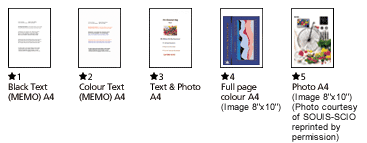
| Black Text (Memo) A4 | Approx. 5PPM (Economy)*1 |
| Colour Text (Memo) A4 | Approx 3.8 PPM (Economy)*2 |
| Text & Photo A4 | Approx 1.8 PPM (360 dpi)*3 |
| Full Page Colour A4 | Approx 0.8 PPM (360 dpi)*4 |
| Photo A4 | 4'21" per photo* (Fine)*5 |
 |
|
| Resolution | Maximum 1440 x 720 dpi |
| Paper Handling | |
| Paper feed method | Friction feed with paper feeder |
| Paper hold capacity | Plain paper: 100 Epson Inkjet transparencies: 20 Envelopes: 10 Epson Photo Quality Inkjet card: 20 Epson Photo Quality Inkjet paper: 65 Epson Photo Quality Glossy Film: 20 Epson Photo Paper: 20 |
| Paper sizes | A4, Letter, B5, Legal, Envelopes (No.10, DL, C6), Index card (A6, 5 x 8", 10 x 8") |
| Paper Thickness | 0.08mm - 0.11mm (paper) 0.16mm - 0.43mm (envelopes) 0.23mm (index cards distributed by Epson) |
| Input data buffer | 32 Kbyte |
| Interfaces | Centronics® -type 8-bit parallel interface (IEEE-1284 Nibble mode) USB interface |
| Ink cartridge | |
| Black ink cartridge | (S020187) |
| Type | Exclusive cartridge |
| Colour | Black |
| Print capacity | 540 pages, comparable with 3.5% ECMA (ISO 10561), text @ 360 dpi |
| Colour ink cartridge | (S020191) |
| Type | Exclusive cartridge |
| Colours | Cyan, Magenta, Yellow |
| Print capacity | 300 pages: 5% each CMY (total 15%) in calculation |
| Control panel | |
| Functions | Ink Cartridge Replacement, Cleaning, Load/Eject |
| Indicators | Power, Paper Out, Ink Out (black), Ink Out (colour) |
| Environmental conditions (operating) | |
| Temperature | 10° to 35°C |
| Humidity | 20% to 80% RH |
| Electrical specifications | |
| Rated Voltage | AC 220 to 240V |
| Rated frequency | 50 to 60 Hz |
| Power consumption | Approximately 18W (ISO 10561 Letter Pattern) |
| Dimensions (storage) | |
| Width x Depth x Height | 429 x 261 x 167mm |
| Weight | 5.2 kg |
| Printer Software (available on CD-ROM only) | |
| Printer Driver | Mac OS 8.1 or later with USB Microsoft® Windows™ 95/98/2000 Microsoft® Windows™ NT 4.0 |
| On-line Guide | Yes |
Product Options
| Product Code | Description |
|---|---|
| Products | |
| C301051 | Epson Stylus COLOR 670 |
| Cables | |
| EPCP | Parallel printer cable |
| Printer type | |
|---|---|
| Printing method | On-demand inkjet (piezoelectric) |
| Nozzle configuration | 64 nozzles (Black) 32 x 3 nozzles (Cyan, Magenta, Yellow) |
| Print direction | Bi-directional with logic seeking |
| Print Speed | |
| Black Text (Memo) A4 | Approx. 5PPM (Economy)*1 |
| Colour Text (Memo) A4 | Approx 3.8 PPM (Economy)*2 |
| Text & Photo A4 | Approx 1.8 PPM (360 dpi)*3 |
| Full Page Colour A4 | Approx 0.8 PPM (360 dpi)*4 |
| Photo A4 | 4'21" per photo* (Fine)*5 |
|
|
| Resolution | Maximum 1440 x 720 dpi |
| Paper Handling | |
| Paper feed method | Friction feed with paper feeder |
| Paper hold capacity | Plain paper: 100 Epson Inkjet transparencies: 20 Envelopes: 10 Epson Photo Quality Inkjet card: 20 Epson Photo Quality Inkjet paper: 65 Epson Photo Quality Glossy Film: 20 Epson Photo Paper: 20 |
| Paper sizes | A4, Letter, B5, Legal, Envelopes (No.10, DL, C6), Index card (A6, 5 x 8", 10 x 8") |
| Paper Thickness | 0.08mm - 0.11mm (paper) 0.16mm - 0.43mm (envelopes) 0.23mm (index cards distributed by Epson) |
| Input data buffer | 32 Kbyte |
| Interfaces | Centronics® -type 8-bit parallel interface (IEEE-1284 Nibble mode) USB interface |
| Ink cartridge | |
| Black ink cartridge | (S020187) |
| Type | Exclusive cartridge |
| Colour | Black |
| Print capacity | 540 pages, comparable with 3.5% ECMA (ISO 10561), text @ 360 dpi |
| Colour ink cartridge | (S020191) |
| Type | Exclusive cartridge |
| Colours | Cyan, Magenta, Yellow |
| Print capacity | 300 pages: 5% each CMY (total 15%) in calculation |
| Control panel | |
| Functions | Ink Cartridge Replacement, Cleaning, Load/Eject |
| Indicators | Power, Paper Out, Ink Out (black), Ink Out (colour) |
| Environmental conditions (operating) | |
| Temperature | 10° to 35°C |
| Humidity | 20% to 80% RH |
| Electrical specifications | |
| Rated Voltage | AC 220 to 240V |
| Rated frequency | 50 to 60 Hz |
| Power consumption | Approximately 18W (ISO 10561 Letter Pattern) |
| Dimensions (storage) | |
| Width x Depth x Height | 429 x 261 x 167mm |
| Weight | 5.2 kg |
| Printer Software (available on CD-ROM only) | |
| Printer Driver | Mac OS 8.1 or later with USB Microsoft® Windows™ 95/98/2000 Microsoft® Windows™ NT 4.0 |
| On-line Guide | Yes |
Product Options
| Product Code | Description |
|---|---|
| Products | |
| C301051 | Epson Stylus COLOR 670 |
| Cables | |
| EPCP | Parallel printer cable |