Discproducer PP-100III
The Professional CD/DVD/BD disc publishing system
| Discproducer | |
|---|---|
| PRODUCT NAME | Discproducer PP-100III |
| PRODUCT CODE | C11CH40031 |
| MAIN UNIT | ||
|---|---|---|
| PUBLISHING SPEED *(Burn & Print) |
CD | 30 discs/hour, Epson-specified CD-R 600 MB data volume, writing speed: Drive max speed: 40 x |
| DVD | 15 discs/hour, Epson recommended DVD-R 3.8 GB data volume, writing speed: Drive max speed: 12 x |
|
| BD | 8.5 discs/hour, Epson specific BD-R 23.8 GB data volume, writing speed: Drive max speed: 8 x |
|
| Printing Only (CD/DVD) | 65 discs/hour, bidirectional (fast mode) 45 discs/hour, bidirectional (fine mode) |
|
| WRITING SPEED | CD | Maximum 40 x |
| DVD-R, DVD+R | Maximum 12 x | |
| DVD-R DL, DVD+R DL | Maximum 8 x | |
| BD-R | Maximum 8 x | |
| BD-R DL | Maximum 8 x | |
| POWER CONSUMPTION | 52 W (Operation), 27 W (Standby) | |
| ELECTRICAL | Rated Voltage | AC100V to AC240V |
| Frequency | 50hz to 60Hz | |
| EXTERNAL DIMENSIONS | 377mm (w) x 493mm (d) x 348mm (h) (Excluding the AC cable & USB cable) | |
| WEIGHT | Approximately 24Kg (Including stackers and ink cartridges, excluding the AC cable and discs) |
|
| ENVIRONMENTAL CHARACTERISTICS | Temperature and Relative Humidity | 10° C to 35° C, 20% to 80% (no condensation) |
| EXPECTED LIFETIMES | Ink Pad Life | Approx. 30,000 printable discs ** |
| HARDWARE | ||
|---|---|---|
| CD/DVD DRIVES | Number of Drives | 2 drives |
| PRINTER MODE | Print Head | Black ink 180 Nozzles, Colour ink 180 Nozzles x 5 |
| Print Direction | Bidirectional or unidirectional | |
| Print Resolution - Hi-Speed | 1440 dpi x 720 dpi (fast mode) | |
| Print Resolution - Hi Resolution | 1440 dpi x 1440 dpi (fine mode) | |
| PRINT AREA | Standard setting for outside diameter | 116 mm |
| Outside diameter setting range | 70-119.4 mm | |
| Standard setting for inside diameter | 45 mm | |
| Inside diameter setting range | 18-50 mm | |
| Guaranteed print area | 45-116 mm | |
| STACKER CAPACITY | Stacker 1,2,3 | 50 discs (It's possible to print 100 discs without stopping by using both stackers 1 and 2.) |
| Stacker 4 | 5 discs | |
| INTERFACE | 1 x USB 3.0 Super speed |
|
| INK CARTRIDGE | Ink Type | Dye ink |
| Colours | Yellow, Magenta, Cyan, Light Cyan, Light Magenta, Black | |
| Yield *** | 1,000 discs or more (diameter 45 - 116 mm, 16.7% colour sharing, continuous printing, mode setting: Fine) | |
| Cost per disc | Cost per Disc calculations are based on Epson's Internal testing. For further details please see Disc yields page. | |
| MAINTENANCE BOX | Waste ink maintenance box is replaceable by users on-site in the field. This is available for purchase as a separate consumable item (Model PJMB100). | |
| SOFTWARE (WINDOWS) | ||
|---|---|---|
| Total Disc Maker | Installed on the user's computer to publish discs. | |
| Total Disc Monitor | Displays the status of JOBs and devices. | |
| Total Disc Setup | Installed on user's PC for easy PP-100III setup. | |
| TD Bridge system | Incorporation tool to use with other companies' applications, supplied free via the website on product registration. click hereto download. | |
| WRITING DATA EDITING | Supported file format | |
| Data files | Any files | |
| Audio files | WAVE, MP3, WMA | |
| Movie files | MPEG1 | |
| Output support | data CD, audio CD, audio & data CD, Video CD, data DVD, Video DVD, BD | |
| WRITING DATA COPYING | Direct copying | data CD, music CD, DVD (only single session and Disc-At-Once supported), BD |
| Image file copying | ISO | |
| LABEL EDITING | Template | Up to 58 templates (EPSON original) + 51 Patterns |
| Background | Full-filled, gradation, graphic, including EPSON original background files (data size, volume label/title), arch style strings | |
| Printing following items | ||
| Text | strings, automatic inserted strings (published date, created date, counter, number of sheets, number of pages), writing face gearing strings (date size, volume label/title), arch style strings | |
| Graphic | BMP, JPEG, TIFF, PNG, EPSON original graphic files (up to 81), trimming, transmit | |
| Thumbnail | tile, circle, gearing with writing surface | |
| Folder list | Create folder list automatically | |
| Diagram | Straight line, rectangle, oval | |
| Export | TD Maker original formatted file. | |
| PUBLISHING | Publishing modes (number of copies) | |
| Batch mode: | 1- 100 CDs/DVDs/BDs, 3 stackers used | |
| Standard mode: | 1- 50 CDs/DVDs/BDs, 2 stackers used | |
| External output mode: | 1- 5 CDs/DVDs/BDs, 2 stackers & pick-up tray used | |
| Data comparing | Data comparing is selectable (audio CD not supported) | |
| Number of discs | 1 disc to 100 discs (depend on publishing mode) | |
| STATUS MONITOR | Job monitoring | Job status, Cancelling, Pausing, Restarting |
| Device monitoring | Ink remaining, Drive status, Printing status, Stacker status, Media remaining | |
| SOFTWARE (MAC) | ||
|---|---|---|
| Total Disc Maker | Installed on the user's Mac to publish discs. | |
| Total Disc Utility | Displays the status of JOBs and devices and change the publish settings. | |
| WRITING DATA EDITING | Supported file format | |
| Data files | Any files | |
| Audio files | WAVE, MP3, AIFF, AAC | |
| Movie files | MPEG1 | |
| Output support | data CD, audio CD, data DVD, Video DVD, BD | |
| WRITING DATA COPYING | Direct copying | data CD, audio CD, DVD (only single session supported), BD |
| Image file copying | ISO 9660 Level2, UDF Ver1.02, Joliet, HFS+ | |
| LABEL EDITING | Printing following items | |
| Text | strings, automatic inserted strings (published date, created date, counter, number of sheets, number of pages), writing face gearing strings (date size, volume label/title) | |
| Graphic | BMP, JPEG, TIFF, PNG, PDF, AI (For PDF and AI files are available only they can be previewed from Finder.) | |
| Barcode | JAN8/EAN8, JAN13/EAN13, ITF, CODE128, PDF417, QR(model 2), CODE39, NW-7 |
|
| Export | Windows bitmap. jpeg, jpeg2000, tiff, png | |
| PUBLISHING | Publishing modes (number of copies) | |
| Standard mode: | 1- 100 | |
| Low volume mode: | 1-20 (Stacker 3 is used in this mode) | |
| Data comparing | Data comparing is selectable (audio CD not supported) | |
| Label type | Epson specified CD/DVD/BD Label CD/DVD/BD Premium Label CD/DVD/BD Label |
|
| Number of discs | 1 disc to 100 discs (depend on publishing mode) | |
| STATUS MONITOR (Total Disc Utility) | Job monitoring | Job status, Cancelling, Pausing, Restarting |
| Device monitoring | Ink remaining, Drive status, Printing status, Stacker status, Media remaining | |
| REQUIRED SYSTEM | ||
|---|---|---|
| REQUIRED PC ENVIRONMENT | Operating System | Windows® 7,Windows® 8, Vista SP1 or later; Windows® XP SP2 or later, Windows® 2000 SP4 or later , Server 2008 R2, Server 2008 SP2 or later; and Server 2003/2003 R2 SP2 or later (Windows XP and Server 2003/2003 R2 32 bit only) |
| CPU | Intel® Pentium® 4 Processor 1.4GHz or higher (2.0GHz or higher for Server 2008) | |
| Memory | 2Gb or larger (Vista: 1Gb or larger) | |
| HDD | 30 Gb available space or larger, (50Gb available space Windows Server 2008) 7,200 rpm or more | |
| Graphics environment | XGA or more, 65,536 colours or more | |
| Sound environment | A sound device and a supported driver must be installed for music media. | |
| Interface | USB 2.0 or USB 3.0 | |
| REQUIRED MAC ENVIRONMENT | Operating System | Windows® 7,Windows® 8, Vista SP1 or later; Windows® XP SP2 or later, Windows® 2000 SP4 or later , Server 2008 R2, Server 2008 SP2 or later; and Server 2003/2003 R2 SP2 or later (Windows XP and Server 2003/2003 R2 32 bit only) |
| CPU | Mac OS X 10.6.8 Snow Leopard : Intel Core Duo 1.83GHz or more, Mac OS X 10.7.3 Lion : Intel 64bit CPU Mac OS X 10.8.2 Mountain Lion : 2GB or larger |
|
| Memory | Mac OS X 10.6.8 Snow Leopard : 1GB or larger, Mac OS X 10.7.3 Lion : 2GB or larger, Mac OS X 10.8.2 Mountain Lion: 2GB or larger |
|
| Graphics environment | Graphics environment: XGA or more | |
| Interface | USB 2.0 | |
| SUPPORTED MEDIA | ||
|---|---|---|
| SIZE | Outside diameter | 120 mm ± 0.3 mm |
| Inside diameter | 15 mm + 0.1/-0 mm | |
| Thickness | 1.2 mm + 0.3/-0.1 mm | |
| FORM | Only standard 12 cm (4.7 inch) discs | |
| TYPE | CD-R, DVD-R, DVD+R, DVD-R DL, DVD+R DL | |
| SURFACE | Inkjet printable | |
| CONSUMABLES | ||
|---|---|---|
| PRODUCT | PRODUCT NAME | PRODUCT CODE |
| Ink cartridge cyan | PJIC1(C) | C13S020447 |
| Ink cartridge light cyan | PJIC2(LC) | C13S020448 |
| Ink cartridge light magenta | PJIC3(LM) | C13S020449 |
| Ink cartridge magenta | PJIC4(M) | C13S020450 |
| Ink cartridge yellow | PJIC5(Y) | C13S020451 |
| Maintenance Box | PJMB100 | C13S020476 |
| WARRANTY* | |
|---|---|
| 1 year (free upgrade to on-site on product registration) | |
| Click here to purchase Epson Extended Warranties, Accessories, and Ink Cartridges online | |
| * For more information on warranty visit Epson Warranty. | |
| REMARKS | |
|---|---|
| * Test condition: [ PC Used for testing ] OS: Windows® XP Professional SP2, CPU: Pentium®4 2.4 GHz, Chipset: Intel®, RAM: 1 GB, Free HDD area: 10 GB, I/F: USB 2.0 High speed, Software: Epson Total Disc Maker < Measurement of writing and printing per an hour > Writing mode: fast, Capacity: 600MB (CD), 3.8GB(DVD), Printing mode: fast and full-colored, Result: 32 CDs or 18 DVDs < Measurement of printing per an hour > Printing mode: fast and full-colored, high quality and full-colored, Result: 65 discs (fast) or 50 discs (high quality) Example image of printing data is below. | |
 |
|
| ** The printer's ink pad is estimated to become saturated and need replacing after about 30,000 discs. Based on printing 2000 discs per month, bi-directional. Actual results will vary based on such factors as images printed, print settings, media type, frequency of use and temperature. | |
| When an ink cartridge needs replacing, you cannot continue copying or printing without replacing the relevant cartridge, even if other cartridges don’t need replacing. | |
| You should leave a cartridge needing replacement installed in the printer until you have obtained a replacement. Doing otherwise may cause ink remaining in the print head nozzles to dry out and affect printer operation. | |
| To ensure ongoing print quality and trouble-free operation, a variable amount of ink will be present in a cartridge that is low on ink after the “Replace Cartridge” indicator comes on. | |
| This printer will use a quantity of ink from each cartridge for print-head cleaning and maintenance and will use ink from all cartridges for both black and colour printing. | |
| All features and specifications described are subject to change without notice. EPSON is a registered trademark of Seiko Epson Corporation. Discproducer and AcuGrip are trademarks of Seiko Epson Corporation. Windows is a registered trademark of Microsoft Corporation in the United States and/or other countries. Pentium is registered trademark of Intel Corporation in the U.S. and other countries. Company and product names are trademarks or registered trademarks of their respective companies. |
|
| Usage Conditions | |
|---|---|
| Epson products are designed and manufactured to be highly reliable and last a long time when used according to their specifications. With any system, product or device used in situations where human life may be involved or at risk, Epson advises that you should take all necessary steps to ensure the suitability of your Epson product for inclusion in your system, and recommends that you include fail-safe procedures and redundancy support or backup equipment in your system, to maintain the maximum safety margin and optimum system reliability. Examples include but are not limited to – do not interfere with any electrical components within the device, do not use items supplied with the product for purposes other than as intended by Epson (e.g. power cords, inks, CDs, plastic wrapping), do not make modifications to the product and avoid the use of third party consumables. Consult Epson if you have any questions or concerns. |
View or Download additional information
Find drivers, manuals and product setup for Discproducer PP-100III.
Go to Driver DownloadsFind important information about ink cartridge composition, precautions for safe handling and use, regulatory considerations and more.
Go to Material Safety Data Sheets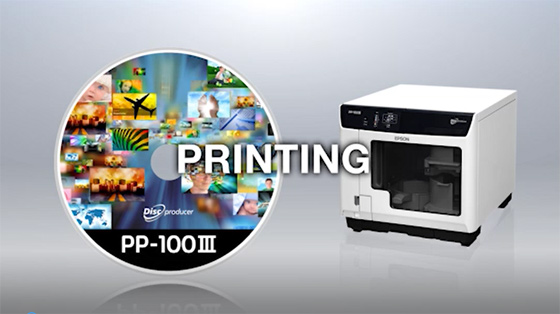
DiscProducer PP-100III Video
DiscProducer PP-100III Video
| Discproducer | |
|---|---|
| PRODUCT NAME | Discproducer PP-100III |
| PRODUCT CODE | C11CH40031 |
| MAIN UNIT | ||
|---|---|---|
| PUBLISHING SPEED *(Burn & Print) |
CD | 30 discs/hour, Epson-specified CD-R 600 MB data volume, writing speed: Drive max speed: 40 x |
| DVD | 15 discs/hour, Epson recommended DVD-R 3.8 GB data volume, writing speed: Drive max speed: 12 x |
|
| BD | 8.5 discs/hour, Epson specific BD-R 23.8 GB data volume, writing speed: Drive max speed: 8 x |
|
| Printing Only (CD/DVD) | 65 discs/hour, bidirectional (fast mode) 45 discs/hour, bidirectional (fine mode) |
|
| WRITING SPEED | CD | Maximum 40 x |
| DVD-R, DVD+R | Maximum 12 x | |
| DVD-R DL, DVD+R DL | Maximum 8 x | |
| BD-R | Maximum 8 x | |
| BD-R DL | Maximum 8 x | |
| POWER CONSUMPTION | 52 W (Operation), 27 W (Standby) | |
| ELECTRICAL | Rated Voltage | AC100V to AC240V |
| Frequency | 50hz to 60Hz | |
| EXTERNAL DIMENSIONS | 377mm (w) x 493mm (d) x 348mm (h) (Excluding the AC cable & USB cable) | |
| WEIGHT | Approximately 24Kg (Including stackers and ink cartridges, excluding the AC cable and discs) |
|
| ENVIRONMENTAL CHARACTERISTICS | Temperature and Relative Humidity | 10° C to 35° C, 20% to 80% (no condensation) |
| EXPECTED LIFETIMES | Ink Pad Life | Approx. 30,000 printable discs ** |
| HARDWARE | ||
|---|---|---|
| CD/DVD DRIVES | Number of Drives | 2 drives |
| PRINTER MODE | Print Head | Black ink 180 Nozzles, Colour ink 180 Nozzles x 5 |
| Print Direction | Bidirectional or unidirectional | |
| Print Resolution - Hi-Speed | 1440 dpi x 720 dpi (fast mode) | |
| Print Resolution - Hi Resolution | 1440 dpi x 1440 dpi (fine mode) | |
| PRINT AREA | Standard setting for outside diameter | 116 mm |
| Outside diameter setting range | 70-119.4 mm | |
| Standard setting for inside diameter | 45 mm | |
| Inside diameter setting range | 18-50 mm | |
| Guaranteed print area | 45-116 mm | |
| STACKER CAPACITY | Stacker 1,2,3 | 50 discs (It's possible to print 100 discs without stopping by using both stackers 1 and 2.) |
| Stacker 4 | 5 discs | |
| INTERFACE | 1 x USB 3.0 Super speed |
|
| INK CARTRIDGE | Ink Type | Dye ink |
| Colours | Yellow, Magenta, Cyan, Light Cyan, Light Magenta, Black | |
| Yield *** | 1,000 discs or more (diameter 45 - 116 mm, 16.7% colour sharing, continuous printing, mode setting: Fine) | |
| Cost per disc | Cost per Disc calculations are based on Epson's Internal testing. For further details please see Disc yields page. | |
| MAINTENANCE BOX | Waste ink maintenance box is replaceable by users on-site in the field. This is available for purchase as a separate consumable item (Model PJMB100). | |
| SOFTWARE (WINDOWS) | ||
|---|---|---|
| Total Disc Maker | Installed on the user's computer to publish discs. | |
| Total Disc Monitor | Displays the status of JOBs and devices. | |
| Total Disc Setup | Installed on user's PC for easy PP-100III setup. | |
| TD Bridge system | Incorporation tool to use with other companies' applications, supplied free via the website on product registration. click hereto download. | |
| WRITING DATA EDITING | Supported file format | |
| Data files | Any files | |
| Audio files | WAVE, MP3, WMA | |
| Movie files | MPEG1 | |
| Output support | data CD, audio CD, audio & data CD, Video CD, data DVD, Video DVD, BD | |
| WRITING DATA COPYING | Direct copying | data CD, music CD, DVD (only single session and Disc-At-Once supported), BD |
| Image file copying | ISO | |
| LABEL EDITING | Template | Up to 58 templates (EPSON original) + 51 Patterns |
| Background | Full-filled, gradation, graphic, including EPSON original background files (data size, volume label/title), arch style strings | |
| Printing following items | ||
| Text | strings, automatic inserted strings (published date, created date, counter, number of sheets, number of pages), writing face gearing strings (date size, volume label/title), arch style strings | |
| Graphic | BMP, JPEG, TIFF, PNG, EPSON original graphic files (up to 81), trimming, transmit | |
| Thumbnail | tile, circle, gearing with writing surface | |
| Folder list | Create folder list automatically | |
| Diagram | Straight line, rectangle, oval | |
| Export | TD Maker original formatted file. | |
| PUBLISHING | Publishing modes (number of copies) | |
| Batch mode: | 1- 100 CDs/DVDs/BDs, 3 stackers used | |
| Standard mode: | 1- 50 CDs/DVDs/BDs, 2 stackers used | |
| External output mode: | 1- 5 CDs/DVDs/BDs, 2 stackers & pick-up tray used | |
| Data comparing | Data comparing is selectable (audio CD not supported) | |
| Number of discs | 1 disc to 100 discs (depend on publishing mode) | |
| STATUS MONITOR | Job monitoring | Job status, Cancelling, Pausing, Restarting |
| Device monitoring | Ink remaining, Drive status, Printing status, Stacker status, Media remaining | |
| SOFTWARE (MAC) | ||
|---|---|---|
| Total Disc Maker | Installed on the user's Mac to publish discs. | |
| Total Disc Utility | Displays the status of JOBs and devices and change the publish settings. | |
| WRITING DATA EDITING | Supported file format | |
| Data files | Any files | |
| Audio files | WAVE, MP3, AIFF, AAC | |
| Movie files | MPEG1 | |
| Output support | data CD, audio CD, data DVD, Video DVD, BD | |
| WRITING DATA COPYING | Direct copying | data CD, audio CD, DVD (only single session supported), BD |
| Image file copying | ISO 9660 Level2, UDF Ver1.02, Joliet, HFS+ | |
| LABEL EDITING | Printing following items | |
| Text | strings, automatic inserted strings (published date, created date, counter, number of sheets, number of pages), writing face gearing strings (date size, volume label/title) | |
| Graphic | BMP, JPEG, TIFF, PNG, PDF, AI (For PDF and AI files are available only they can be previewed from Finder.) | |
| Barcode | JAN8/EAN8, JAN13/EAN13, ITF, CODE128, PDF417, QR(model 2), CODE39, NW-7 |
|
| Export | Windows bitmap. jpeg, jpeg2000, tiff, png | |
| PUBLISHING | Publishing modes (number of copies) | |
| Standard mode: | 1- 100 | |
| Low volume mode: | 1-20 (Stacker 3 is used in this mode) | |
| Data comparing | Data comparing is selectable (audio CD not supported) | |
| Label type | Epson specified CD/DVD/BD Label CD/DVD/BD Premium Label CD/DVD/BD Label |
|
| Number of discs | 1 disc to 100 discs (depend on publishing mode) | |
| STATUS MONITOR (Total Disc Utility) | Job monitoring | Job status, Cancelling, Pausing, Restarting |
| Device monitoring | Ink remaining, Drive status, Printing status, Stacker status, Media remaining | |
| REQUIRED SYSTEM | ||
|---|---|---|
| REQUIRED PC ENVIRONMENT | Operating System | Windows® 7,Windows® 8, Vista SP1 or later; Windows® XP SP2 or later, Windows® 2000 SP4 or later , Server 2008 R2, Server 2008 SP2 or later; and Server 2003/2003 R2 SP2 or later (Windows XP and Server 2003/2003 R2 32 bit only) |
| CPU | Intel® Pentium® 4 Processor 1.4GHz or higher (2.0GHz or higher for Server 2008) | |
| Memory | 2Gb or larger (Vista: 1Gb or larger) | |
| HDD | 30 Gb available space or larger, (50Gb available space Windows Server 2008) 7,200 rpm or more | |
| Graphics environment | XGA or more, 65,536 colours or more | |
| Sound environment | A sound device and a supported driver must be installed for music media. | |
| Interface | USB 2.0 or USB 3.0 | |
| REQUIRED MAC ENVIRONMENT | Operating System | Windows® 7,Windows® 8, Vista SP1 or later; Windows® XP SP2 or later, Windows® 2000 SP4 or later , Server 2008 R2, Server 2008 SP2 or later; and Server 2003/2003 R2 SP2 or later (Windows XP and Server 2003/2003 R2 32 bit only) |
| CPU | Mac OS X 10.6.8 Snow Leopard : Intel Core Duo 1.83GHz or more, Mac OS X 10.7.3 Lion : Intel 64bit CPU Mac OS X 10.8.2 Mountain Lion : 2GB or larger |
|
| Memory | Mac OS X 10.6.8 Snow Leopard : 1GB or larger, Mac OS X 10.7.3 Lion : 2GB or larger, Mac OS X 10.8.2 Mountain Lion: 2GB or larger |
|
| Graphics environment | Graphics environment: XGA or more | |
| Interface | USB 2.0 | |
| SUPPORTED MEDIA | ||
|---|---|---|
| SIZE | Outside diameter | 120 mm ± 0.3 mm |
| Inside diameter | 15 mm + 0.1/-0 mm | |
| Thickness | 1.2 mm + 0.3/-0.1 mm | |
| FORM | Only standard 12 cm (4.7 inch) discs | |
| TYPE | CD-R, DVD-R, DVD+R, DVD-R DL, DVD+R DL | |
| SURFACE | Inkjet printable | |
| CONSUMABLES | ||
|---|---|---|
| PRODUCT | PRODUCT NAME | PRODUCT CODE |
| Ink cartridge cyan | PJIC1(C) | C13S020447 |
| Ink cartridge light cyan | PJIC2(LC) | C13S020448 |
| Ink cartridge light magenta | PJIC3(LM) | C13S020449 |
| Ink cartridge magenta | PJIC4(M) | C13S020450 |
| Ink cartridge yellow | PJIC5(Y) | C13S020451 |
| Maintenance Box | PJMB100 | C13S020476 |
| WARRANTY* | |
|---|---|
| 1 year (free upgrade to on-site on product registration) | |
| Click here to purchase Epson Extended Warranties, Accessories, and Ink Cartridges online | |
| * For more information on warranty visit Epson Warranty. | |
| REMARKS | |
|---|---|
| * Test condition: [ PC Used for testing ] OS: Windows® XP Professional SP2, CPU: Pentium®4 2.4 GHz, Chipset: Intel®, RAM: 1 GB, Free HDD area: 10 GB, I/F: USB 2.0 High speed, Software: Epson Total Disc Maker < Measurement of writing and printing per an hour > Writing mode: fast, Capacity: 600MB (CD), 3.8GB(DVD), Printing mode: fast and full-colored, Result: 32 CDs or 18 DVDs < Measurement of printing per an hour > Printing mode: fast and full-colored, high quality and full-colored, Result: 65 discs (fast) or 50 discs (high quality) Example image of printing data is below. | |
|
|
| ** The printer's ink pad is estimated to become saturated and need replacing after about 30,000 discs. Based on printing 2000 discs per month, bi-directional. Actual results will vary based on such factors as images printed, print settings, media type, frequency of use and temperature. | |
| When an ink cartridge needs replacing, you cannot continue copying or printing without replacing the relevant cartridge, even if other cartridges don’t need replacing. | |
| You should leave a cartridge needing replacement installed in the printer until you have obtained a replacement. Doing otherwise may cause ink remaining in the print head nozzles to dry out and affect printer operation. | |
| To ensure ongoing print quality and trouble-free operation, a variable amount of ink will be present in a cartridge that is low on ink after the “Replace Cartridge” indicator comes on. | |
| This printer will use a quantity of ink from each cartridge for print-head cleaning and maintenance and will use ink from all cartridges for both black and colour printing. | |
| All features and specifications described are subject to change without notice. EPSON is a registered trademark of Seiko Epson Corporation. Discproducer and AcuGrip are trademarks of Seiko Epson Corporation. Windows is a registered trademark of Microsoft Corporation in the United States and/or other countries. Pentium is registered trademark of Intel Corporation in the U.S. and other countries. Company and product names are trademarks or registered trademarks of their respective companies. |
|
| Usage Conditions | |
|---|---|
| Epson products are designed and manufactured to be highly reliable and last a long time when used according to their specifications. With any system, product or device used in situations where human life may be involved or at risk, Epson advises that you should take all necessary steps to ensure the suitability of your Epson product for inclusion in your system, and recommends that you include fail-safe procedures and redundancy support or backup equipment in your system, to maintain the maximum safety margin and optimum system reliability. Examples include but are not limited to – do not interfere with any electrical components within the device, do not use items supplied with the product for purposes other than as intended by Epson (e.g. power cords, inks, CDs, plastic wrapping), do not make modifications to the product and avoid the use of third party consumables. Consult Epson if you have any questions or concerns. |
Access the drivers, utilities, and manuals for Epson point of sales and label printer products such as TM printers (TM series), customer displays (DM series), embedded unit printers and kiosk printer mechanisms.
Epson Downloads for POS Printers
GoEpson Downloads for ColorWorks Label Printers
GoContact support or service
Online Technical Query Form
GoFind important information about ink cartridge composition, precautions for safe handling and use, regulatory considerations and more.
Go to Material Safety Data Sheets
DiscProducer PP-100III Video
DiscProducer PP-100III Video